Labels

Friday, September 18, 2015

DELTA Module 2 - Course Outline and Tips

I have decided to take the face-to-face option of Delta Module 2 at International House Tbilisi. The blended option with the Distance Delta was way too expensive.

In Week 1 of the course we had one diagnostic observation for which we had to write a full lesson plan. The lesson plan paperwork, self-reflection and the tutor feedback have to go into the Appendices of the first assignment - Professional Development. Before the start of Week 2, we had to submit one part of it (Stages 1 and 2) - 1000 words, which is actually quite doable. In this part of the PDA you are asked to reflect on your beliefs and classroom practices as a teacher, identify your key strengths and weaknesses and suggest an action plan.
NB When suggesting an action plan, bear in mind that you are going to be evaluated on how far you are progressing in whatever there is in your action plan throughout the course. So be realistic with what skills you can improve in about 3-4 weeks.

Week 1 was also the week in which we had to start getting to know our learners to be able to write a group profile and an individual profile for the first LSA in Week 3. The class profile may not be as difficult to write as the individual profile because you need information about your students' learning preferences and styles,  their interests and reasons for learning English, their general strengths and weaknesses. So during the first week you may need to design lessons and/or questionnaires to find all this out to be able to write the information in your assessed lesson plan.
NB Decide what your first assignment is going to be about to pay attention to your learners' strengths and weaknesses in relation to your first assessed lesson as these two are also part of the individual profile. Typing up the individual profile takes a long time so start this one earlier just to add new information whenever you learn new things about your learners. For your other assessed lessons, you will be using the same profile, but you will need to change the strengths and weaknesses in relation to the lesson section.

In Week 2 we had two developmental observations and had to write two full lesson plans and this made it impossible to start writing the first Language Systems/Skills Assignment earlier. I ended up doing this over the weekend and this was a real burden. I thought I wasn't going to make it by Monday morning because for the research you do, you need to design a lesson based on ideas you discussed in your LSA and write a lesson plan. The challenge here is not to mix skills with systems in your main aims. If your assignment is about some grammar area, then make sure that everything you do in the lesson is around that and is in the main aims. Everything else you do, speaking as a follow-up activity or gist reading for guided discovery should be in subsidiary aims. Actually, you don't have to have subsidiary aims, so you can forget about that for systems assignment. I think this week was very stressful for all trainees and some, including me, even started thinking of dropping out. So be prepared for a lot of stress.
NB It would help if before starting the course you already knew exactly which 2 skills and 2 systems you would like to focus on in your LSAs and do a fair bit of reading about those. For skills you will have to choose 1 receptive and 1 productive skill, you cannot do research on two productive skills, for example. For systems, you choose from pronunciation, grammar, vocabulary, discourse. Discourse might be too challenging to do, so perhaps you shouldn't think of that one.

In Week 3 we taught out first assessed lesson and had to wait until Friday to find out whether the first LSA was a pass or a fail. The tutors warned us in advance that many candidates fail their first LSA and we should not worry if that's the case. A lot here depends on your post-lesson evaluation: if you can discuss the key strengths ad weaknesses of your lesson plan and lesson execution objectively, say what the learners took away from the lesson and provide evidence for that, and explain how your are going to consolidate on the learning, this will affect your grade for the LSA. I got Pass on both the background essay and lesson execution.
NB To get a pass you need to pass only two LSAs (one skills and one systems), but...one has to be the internally assessed one, the other one has to be the externally assessed one. So make sure that for your externally assessed lesson you save a skill or system lesson that is one of your strengths.

In Week 4 we had to submit our second LSA and were again assessed - this time the LSA was skills and I have to say this one was really difficult to analyse for most of us, the trainees. The thing here is decide on the title of your LSA an stick to it in the analysis. Mine was Helping lower level learners understand authentic texts using top-down processing. So in the background essay I had to define what an authentic text was in the introduction and analyse top-down processing in the Analysis section. I analysed the types of schematic knowledge and top-down processing which needed to be explained in relation to stages of the lesson and types of activities. This all has to be based on the reading you do. I found Nuttall's book very useful for this. I got Merit for both the background essay and lesson execution.
NB The stress level at this point started escalating. The course became hell for all of us by Friday when we were waiting for feedback. So be prepared for a lot of stress because if you cannot handle stress, you shouldn't be taking the course.

In Week 5 we had a bit of a break. This was the week of Experimental Practice when you choose any approach in ELT that you have never tried before and try it on your learners. You are only observed by your peers and the background essay, lesson plan and the post-lesson evaluation form Part B of your Professional Development Assignment. For a Pass in the Module, PDA has to be submitted and does not have to be a Pass.
This week we had a lot of fun, I have to say. Some of us experimented with Dogme, some with the Silent way, Suggestopedia and strong-end TBL. You need to do the research before you teach the lesson because you need to have a clear idea about the approach/method. You should also write the background essay before the lesson, 2000 words, + you write 500 words of post lesson evaluation which is part of the assignment. I did mine on Dogme and my learners loved it. I decided that Dogme was worth trying out with my own groups back home. I got a Pass for my Experimental Practice paper.
We also had a developmental observation this week for which we prepared a lesson to test one of the approaches we were going to use in one of the remaining LSAs. This was very helpful for us actually although that meant extra lesson plan writing. Still I would highly recommend requesting a developmental observation, which is not assessed, to practise the approach you are going to employ in your LSA 3 or 4, especially 4, as it is externally assessed and it is of utmost importance to pass both parts of it.
NB This week we all started to understand what the second module of DELTA is all about and it became a matter of good time management skills, because if you are bad at that, then the course will be even more stressful for you.

In Week 6 we had to submit LSA 3 background essay and teach the third assessed lesson. I think this week it was less stressful because we were all more worried about the external assessment the following week. In this week the tutors changed TP groups. So the first two lessons and PDA Part A were assessed by one tutor, and PDA Part B and LSA 3 were assessed by the second tutor.
For my third LSA I chose writing and the title was Helping lower level learners writ formal emails. The focus of the lesson was writing emails of enquiry. I found writing this LSA easier than the previous two, because we had our tutor's feedback to base this one on. Again, the Analysis section of the essay was not so easy, and everyone found skills analysis more difficult than systems analysis.
The moods in general were gloomy and everyone was only thinking about the end of the course. Although I got Merit on both - the essay and the lesson, I was a bit worried about LSA 4, perhaps because of the fact that this one was going to be assessed externally and had to be at least a pass on both.
NB It would help if you could think of your LSA 4 well before the time you have to write it. It saves you time and worry. I decided this in Week 4 and did not have to worry about not having ideas about how to stage the lesson and how to deliver it. Some of my peers felt drained by Week 7 and could not come up with ideas.

In Week 7 we had our externally assessed lesson. Although we all found writing LSA 3 easy, everyone was again stressed about LSA 4. And it did seem difficult to write. I think we were all overthinking and wanted to include everything our tutors told us about. But the word limit would not let us do that, of course. After the lesson we were given 48 hours to write the post-lesson evaluation and send it to the main tutor. I think this is a rule for all Delta centres, but I might be wrong. After the last LSA it was really hard to get down to the post-lesson evaluation and all of us felt the same way. We were too exhausted to do anything. But the next day after the external we all partly got our senses back. So I would think that it wasn't just us and many Module 2 trainees feel drained the day of the external assessment as it is way too stressful.
In Week 7 we also had to write Stage 4 for PDA Part A and submit it for it to get a final grade of Pass or Fail. I did this one before my externally assessed lesson as I knew that after that I would be more dead than alive to be able to write it. And it proved to be a good idea. I couldn't even reply to my mail that day, leave alone write an assignment. So if you can, try to complete your PDA Stage 4 before your external because after it, you may find it impossible to do.
The last day of the course was about where to next. But I don't think we were prepared to think about any other courses that day. We still need to get our results in two months' time so we are definitely not going to take any courses yet.
NB Don't worry if the external assessor doesn't talk to you or smile. They are not allowed to. So take it as something normal.

All in all, the Delta course is worth taking but you should forget about life while doing it and you must be prepared to a lot of stress.

Good luck to everyone who is about to start it. And good luck to everyone who is waiting for the results.

Saturday, January 24, 2015

DELTA Module 3 Reading List

Before my course started, I wanted to read the books necessary for the third module to be prepared but I couldn't find much on the reading list for Module 3. When the course started, I realised how useful it would have been for me to have read at least some of the books beforehand.

To help other candidates, I decided to share the reading list for the module. Now, apart from the books for your specialism, which you ideally choose before the course starts, there are also books that are a must-have and a must-read for all specialisms. I will start with those.

The extended assignment for this module consists of five parts. For each part of your assignment, you ideally need to refer to 3-4 books (for your specialism even more), which should go into the bibliography at the end of your assignment. Some books are needed for parts 2, 3 and 4. To write the first part, you need to read quite a few books on the specialism of your choice. I chose Teaching learners online/through distance.blended learning. For this specialism as well as for some others, I will share the book list at the end of this post.

The second part of the assignment is Needs Analysis of your current or potential group of students. You need to read about learning styles, motivation, needs analysis and diagnostic testing. The books to read are:
  1. Graves, K. 1996 Teachers as Course Developers CUP
  2. Graves, K. 2000 Designing Language Courses Heinle and Heinle
  3. Hughes, A. 2003 Testing for Language Teachers CUP
  4. Lightbown, P.M. and N. Spada 2013 How Languages are Learned OUP
  5. Richards, J. 1990 The Language Teaching Matrix CUP
  6. Williams, M. and L.R. Burden 1997 Psychology for Language Teachers CUP
In the third part of the assignment you write your Course Proposal and for this you need to read about the principles of syllabus and course design. The books (in addition to the ones for part two) for this part are:
  1. Nunan, D. 1989 Syllabus Design OUP
  2. Nunan, D. 1988 The Learner Centred Curriculum CUP
  3. Harmer, J. 2007 The practice of English Language Teaching Pearson (not on the list but I found it very useful)
In part four of your assignment you need to discuss Assessment and Evaluation. To complete this part, you again need some of the books from the lists above and also:
  1. McNamara, T. 2000 Language Testing OUP
Part five is the conclusion so you just refer to the books you cross-referenced in part one of the assignment, books related to your specialism.

Now for the specialisms, which are:
  1.  Business English
  2. Teaching young learners/young adults
  3. English for Special Purposes
  4. English for Academic Purposes
  5. ESOL learners with clear specialist needs 
  6. Teaching exam classes
  7. Teaching one-to-one
  8. Teaching monolingual classes
  9. Teaching multilingual classes
  10. Teaching in an English-speaking environment
  11. Teaching in a non-English-speaking environment 
  12. Teaching learners online, through distance/blended learning 
  13. Teaching English to learners with special requirements
  14. Language development for teachers
I am sure you will know a lot more about the specialism you choose, so I would like to share the books which I was required to read for Teaching learners online, through distance/blended learning  and the books which I found useful for this assignment. A lot of useful articles regarding online teaching can also be found on the Internet.
  1. Dudeney G., N. Hockly and M. Pegrum. 2013. Digital Literacies. Pearson
  2. Hockly, N. and L. Clandfield. 2010. Teaching Online Tools and Techniques, options and opportunities.Delta Publishing
  3. Salmon, G. 2011. E-Moderating: The key to teaching and learning online. Routledge 
  4. Salmon, G. 2013. E-Tivities: The key to active online learning. Kogan Page
  5. Sharma, P. and B. Barrett. 2007. Blended Learning. Using Technology in and beyond the language classroom. Macmillan 
  6. Teeler D with Gray P 2000 How to use the Internet in ELT Longman
  7. MacDonald, J. 2008 Blended learning and online tutoring Gower Publishing Limited.
As in my research I focused on an IELTS exam class, I can also suggest some books for Teaching Exam Classes specialism. These are:
  1. Burgess, S. & Head. K. 2005 How to Teach for Exams Pearson 
  2. Baxter, A. 1997 Evaluating Your Students Richmond Publishing
  3. Hughes, A. 1989 Testing for Language Teachers CUP
  4. May, P. 1996 Exam Classes OUP
  5. McNamara, T. 2000 Language Testing OUP
  6. Bygate, M. 1987 Speaking OUP
  7. Anderson. A. & Lynch, T. 1988 Listening OUP
  8. Nutall, C. 2005 Teaching Reading Skills Macmillan
  9. Tribble, C. 1996 Writing OUP
  10. Kelly, G. 2000 How to Teach Pronunciation Pearson
  11. Thornbury, S. 2005 How to Teach Speaking Pearson
  12. Harmer, J. 2004 How to Teach Writing Pearson


Sunday, October 12, 2014

Zooburst - a storytelling tool

 Zooburst is a digital storytelling tool which allows users to create interactive 3D pop-up books. The tool is so easy to use, that teachers can ask their learners to create their own books as well. It has MyClasses section where teachers can create protected spaces for their learners' books, but this feature is not free.

 Having registered, click on MyBooks tab to start creating a new book. This is also the space where all your created books will show. At first you need to title your book and write a description. The latter is optional. What I like about this tool is that you can make the book visible to everyone, anyone with a link or only to yourself. So if you are going to use the book in the classroom, you can set it to "Only me".

The work area is self-explanatory - you don't really need to be an expert to create a book. To add a picture, you can either do a search inside Zooburst or upload your own photos. When creating the book, remember to save each page you have not to lose any. You can make a maximum of 10 pages but that's enough for a short classroom activity.

The first book I created was for my students to revise past tenses. I showed them a page at a time and they needed to write a sentence or two describing the picture and connect the description of the first picture with the following one to end up with a story. The students were working in pairs and spent a great deal of time discussing each picture and negotiating the meaning. They all enjoyed the activity.

Another interesting feature of this tool is that it can be presented online. All you need to do is to print the ZB logo, click the Camera tab above the book you want to present, show the printed logo to the camera and your book will pop out from the logo on the camera.

Here is what the book is like.


Sunday, February 23, 2014

E-Book Publishing Options

Sometimes the coursebooks we use do not seem to contain what our learners need, or the information is outdated and we, teachers, start adapting or upgrading the content.

E-book publishing sites actually allow teachers and their learners to create textbooks that meet their requirements. Here are 3 of those sites.


The good thing about this one is that it has an in-built cover builder so that you don't have to create one yourself. There are quite a lot of images to choose from for the cover and it also has a table of content option. These two options make it really easy to create a book. In terms of the book itself, there are two options: either to type the book inside the site or upload a written up book from your computer. Video or any other interactive source cannot be added but you can add images.

On the negative side, the book is not embeddable which for me is not such a good option. I need to create a book which I can embed into my learners wiki and/or Moodle, because, otherwise, they will not complete the tasks not to make their posts public.


This site works more or less the same as BookRix but it doesn't have an in-built cover or content options - you will need to create these yourself. It also doesn't have an option of typing the book in-site - you have to upload a ready made book to it but, I think, the book looks a lot better and you can also get an embed code to add the book itself to a site you run for your learners. Th flipping pages also look good.

Issuu also doesn't support any interactive options, but still it is worth having a look at it.

This is the same book but published on Issuu this time.
3. Glossi

Glossi is a fairly simple tool. You use page templates offered on the site. You create your own cover and can search Google for images for your cover or pages you want to create. Video can be embedded easily which makes it a great tool for a flipped classroom. But make sure to save every page you create not to lose the work if something goes wrong.

The book can be embedded onto a site and is very interactive.

Here's what I have created on Glossi.


Thursday, January 9, 2014

DELTA Module 1 Tips

Having completed the first module and taken the exam, I decided to share some tips with those planning to take the course.

I chose to do the course with TheDistanceDelta because the online mode is more convenient for me as I don't have to give up work and travel somewhere to do it and I can also take care of my family while doing the course.

Initially (the first week only) the course seemed easy enough and we were all quite optimistic about it but then we started doing the assignments (tasks from the exam papers), panic set in and the forums started filling up with pessimistic and desperate  messages. Sometimes I didn't even want to check the threads not to lose faith completely. Working full-time didn't help either. So, if you can work part-time while taking the course, it will be a very good idea to do so.

Although the course is very demanding, there are some things which could be done before and during the course to ease the tension.

1. Before the course starts

Make sure you read (and even re-read)

  • Beyond the Sentence by Scott Thornbury,
  • About Language by Scott Thornbury,
  • An A-Z of ELT by Scott Thornbury (this one is a must-have book for the whole course and you'd be better off almost memorizing the terms in it as good use of terminology will earn you extra points),
  • How to teach pronunciation by Gerald Kelly (this one is also very important because knowledge of phonology and phonetics is tested very often).
This is essential to do because it will help you a lot during your training.

2. During the course

You will need to refer to An A-Z of ELT during the course, so I would advise buying the book. Throughout both exam papers terminology is tested and you are expected to use the correct terms not the ones you use with your students (for the latter you don't gain any points) and the terminology needs to be spelt correctly for you to get a point - any mistakes and goodbye a valuable point. This British Council page may also come handy.

There is a Quizlet set to memorize the terminology and practise spelling and the app is free for Android and iOS so you can install it on your phone or tablet and work with the cards on the way to work and back home. Alternatively, you can create your own set on Quizlet but before the course because during it you won't have much time.

It is also useful to have Grammar for English Language Teachers by Martin Parrot which has grammar tasks for teachers to do and they help a lot in the exam preparation.

During this time it is very important to read about the development of ELT, the approaches and methods from Grammar Translation to Principled Eclecticism - names of people and approaches taken in each method are very important for the exam. 

Revise testing terminology and what each kind of test tests. This also comes up very often in the exam papers. There is even a task which asks you to analyse a test in relation to a certain learner with certain needs in a certain context. 

Also read this Examination Report to see what the guideline answers are and how you should approach each task. 

And revise terminology of phonology again and again. Analyse anything your students say in English for features of connected speech, assimilation, elision, etc.

3. Before the exam

Make sure you do a full mock exam under exam conditions to see which sections you need to spend more time on and, in general, to get a feel for the exam itself. Timing is tough for the tasks and you may find that you do not have enough time to complete a task or two. I managed to complete the tasks but didn't have time to check anything at all. This, I think, is one of the toughest challenges in the exam. 

The day before the exam, I revised terminology for phonology and I was right in doing so - most part of the exam tested phonology related terminology and various features of pronunciation.

And finally, get enough sleep! 

Good luck with the exam!


Saturday, December 28, 2013

The '11 Challenge' Post

I wonder why the '11 Challenge' started around Christmas time - maybe we have more free time to take the challenge. 

Here are the 5 rules for tagging or perhaps tag blogging or blog tagging.


1. Acknowledge the nominating blogger.

2. Share 11 random facts about yourself.
3. Answer the 11 questions the nominating blogger has asked you.
4. List 11 bloggers. You cannot nominate those bloggers who have nominated you.
5. Post 11 questions for the bloggers you have nominated to answer. 

Task 1. Acknowledge the nominating blogger.

I have been tagged by my dear friends Debora Tebovich and Sanja Bozinovic.

Task 2. 11 Random facts about me.

1. I only like shopping for books, DVDs and computers.
2. I really dislike cold weather.
3. Because I dislike the smell of beer, I mix it with Sprite to drink it and many people laugh at me when I do that.
4. I love my first cup of coffee in the morning.
5. I love Doctor Who and Torchwood series and can watch the same episodes over and over again.
6. When I was 4 years old I fell into a lake and nearly drowned. Since then I am afraid of water and never learned to swim.
7. I can play the piano.
8. I love reading detective stories and at the moment my favourite writer is James Patterson.
9. I love Chinese food and can cook it too.
10. I don't watch TV at all. To watch the programs in point 5 I buy the DVDs.
11. I dislike crowds and during public holidays I don't go out. Being in a crowd makes feel dizzy.

Task 3. Answer the questions put forward to you by the nominating blogger.

Answers to Debora's questions
1.   How often do you feel exposed to dilemmas as an Educator? How do you work them out?
Every so often. My response to a dilemma largely depends on what the problem is. If, for example, some of my students are lagging behind, I try to understand the reason and address it.
2.   What plants and flowers do you have at home?
I have quite a few plants at home but, to be honest, I don't know what they are called. One of my colleagues keeps on giving them to me and I look after them, but haven't even tried to find out what they are.
3.   Have you ever got stuck in an elevator?
Yes, I have. This was a very long time ago. This was 20 or 22 years ago. I got stuck in the lift with two of my friends and before the 'rescue team' arrived, we had spent the time doing homework. I thought it was fun. :)
4.   What is that lovely childhood memory that comes to you every once in a while?
My mum decorating a cake with oranges and tangerines and me secretly eating them off the cake.
5.   If English is not your mother tongue, do you ever need to read subtitles when you watch a movie in English?
I did before, like about 10 years ago. Now I don't need subtitles mainly because the main language of communication for me is English.
6.   What makes you laugh?
Many things and situations. I actually like laughing and can find something funny in everything.
7.   If you could spend a year focusing on research, what would you research? Why?
What effect online/blended learning might have on children diagnosed with so called ADHD. I still doubt the existence of such a thing and I would like to know if these children could cope with learning better in an online mode.
8.   How do you keep track of your digital files?
I save them in Google docs, Dropbox and Diigo.
9.   When was the last time you danced?
On 25 December we were celebrating Christmas in the office. I put some music on and we danced a bit before our lessons started.
10.    Who do you admire and why?
There isn't just one person I admire. I admire those who don't give up if they encounter problems and try to make a difference. Perhaps because I myself don't give up, I dislike it when people break without even trying to do something. 
11.    Are you good at setting goals? Do you follow a certain process to set your goals?
I think I am usually good at setting goal, although I can be too ambitious sometimes, especially when it comes to doing various courses. I might sometimes choose to take more courses than I can actually handle and then try to complete them. There is n certain process, I think I mainly just prioritize the important ones.

Answer's to Sanja's questions (I might be cheating here by answering two bloggers' questions, but  I am trying to save time :) )
1. What are you going to do differently in the new year (at least during the first month)?
I am not sure how successful I am going to be but I am planning to get enough sleep. 
2. If you could get a free ticket to any destination in the world, where would you like to go?
To South America - if I get a free ticket to one of the South American countries, I can make my own way to the others. I would really love to go to Argentina, Brazil, Peru, Uruguay, etc.
3. If you could choose to live all year in one season, would yo choose winter or summer?
I would definitely choose summer, I really dislike winter and the cold weather that goes with it. 
4. What do you find hardest to teach your students?
Assimilated sounds. They find it hard to understand why sounds change, etc.
5. What do you like about the space you teach (your classroom)?
I think my classroom is welcoming and I really like everything about it. I also like the fact that I don't share it with anyone and can design it the way I like.
6. Which is the most important quality you look for in a community of practice you belong to?
The most important quality for me would be the openness of the community members and the readiness to share and cooperate. This is how we develop as teachers, I think.
7. If you weren't a teacher, what would you do?
Not really sure, but perhaps a lawyer as this was my childhood dream.
8. What is the best way to share what you learn about teaching?
Through blogging and Facebook group. 
9. What do you never go to work without?
I don't have to take anything to work, to be honest, as I have everything I need in my classroom. 
10. Can you think about and share one thing that people usually don't know about the part of the world where you live?
The capital city, Yerevan, although very small, has three micro-climates: it might be snowing in the north of the city, raining in the central part and sunny and warm in the south.
11. If Santa was to bring you only one gadget you can use for teaching or in your free time, what would you wish for?
Lenovo Yoga 11 IdeaPad - I have fallen in love with it, although I don't really need one.

Task 4. Nominate 11 bloggers

1. Dora Bozanic
2. Rose Youssef
3. Hakan Senturk
4. Merve Oflaz
5. Elvina Castillo
6. Adam Simpson
7. Silvia Heshiki
8. Sara Rodriguez Arias
9. Kristina Smith
10. Ana Rivas
11. Claudia Carrill

Task 5. Ask 11 Questions.

1. What is your favourite book genre?
2. Which film have you seen many times and can still watch again? Why?
3. If you could choose any country to move to, which country would you choose and why?
4. What's your favourite drink? How often do you drink it?
5. Which English language course book do you like most and why?
6. Which web-based tool do you like most and why?
7. What's the most difficult for you in your job?
8. What's your favourite place in your town/city? Is there any place you dislike?
9. If you could change one thing in your house/flat, what would you change and why?
10. What's your favourite dish? Can you cook it yourself?
11. What don't you have enough time for?

I look forward to your replies!!! :)


Saturday, October 12, 2013

Web-Based Podcasting Tools

There are different options for creating podcasts, with Audacity being perhaps one of the most popular ones. But because the software looks a bit too complicated, I usually opt for web-based tools available for free.

There are many things an educator can use podcasts for. I mainly use podcasts for various speaking activities as the main aim and listening as the subsidiary aim. This allows my students to practise their speaking skills even more. They can tell stories, or continue each other's stories, etc.

In this blog post, I would like to share some of my favourite podcast tools with you.

AudioPal is the only tool that is interactive, i.e. if an AudioPal recording is embedded into a site, it starts playing automatically as soon as the site loads. So a greeting message or a site introduction message could be perfect. It also allows you to record your message by phone which is a nice option if your mic isn't working very well.

No registration is required and the tool is easy to use. It has record-by-phone, text-to-message, record or upload an MP3 options.

I think the screenshot is pretty self-explanatory.


Chirbit - this site has some nice options: apart from the usual click-to-record to create a podcast option or upload option, it also allows users to convert a Youtube video into a podcast (Chirbit, as it is called on the site) and you can also convert text to audio just like with AudioPal.


It actually takes a very short time to turn a yotube video into a podcast which then can be embedded into a blog or any other site. There is a commenting option, which can be used with students to discuss a Youtube-to-Chirbit talk. Chribits can also be transcribed something that my students enjoy doing. They say that this improves their listening skills and concentration.

Here is an example of a Youtube video turned into a Chirbit.


PodOmatic works more or less the same as the previous ones. With the free account you get 500MB of storage and 15GB of bandwidth a month. So not too bad.

There are many options for sharing the recordings: you can embed the podcast into a blog or a wiki, you can send it to someone's email address, you can share it on many social networking sites. The episodes can aslo be downloaded. So if you are worried about storage, you can just download the episode and then delete it from your podomatic page.

You can also follow other educators and use their recordings, with their permission of course.

Vocaroo - this one is probably the easiest to use. All you need is to go to the website and you are ready to record or upload an audio message.

As you can see, the tool is pretty easy to use. just Click to Record and start speaking.


After you have finished recording, you can listen to it and save or if you dislike it, you can re-record. Then all you need to do is to click save and then you get the options seen on the screenshot below.


You can share the recording, email it to the person it is intended for or simply download it.

The best thing about Vocaroo is that the recordings on the site are not searchable so we don't have to worry too much about privacy.

Voxopop - This tool is the same as the other ones but it is also different in that it is really good for group discussions. A teacher creates a talkgroup and invites students to take part. This could be a discussion of a burning issue or a piece of breaking news. Learners listen to what their teacher has to say, then in the same group they record their own opinions and listen to each other's ideas. Here again we have integrated skills practice: listening and speaking. If the students are required to read the news before they can take part, then they also improve their reading skills.

This is what a talkgroup looks like.


I myself use this tool a lot with my IELTS students. They record their replies and then I record my feedback in the same talkgroup. This makes it easier for each student to track their progress and not get lost in lots of different links.

There are only two drawbacks: 1. the talkgroups are not embeddable, and 2. you do not receive notifications about new posts; you have to log in every day to see if there is anything new or not. Even so, I really like Voxopop. 

Friday, May 10, 2013

Web-Based Collaborative Whiteboards

Some of my Pre-Intermediate adult students told me the other day that there are some grammar points that they would like to revise with me because they couldn't understand them on their own. Not to spend class time on this (we have been given only 62 hours to cover a level), I started looking for web-based whiteboards. I tested some that I found and invited my students to join the online lesson. This was in the evening and everyone was at home, so it was easy for them not to think about work and concentrate on the lesson. I used 3 of the tools to compare and share with you plus 2 extra ones to look at.

1. DrawVille - this is a very simple tool and doesn't require registration. All you need to do is to type in your name and click on Start Drawing. Once you are in, you can send the link to people you want to join the lesson and wait for their names to appear in the 'users' list. There is also a chat room which I used to answer my student's questions. (For this lesson I invited 1 student because he was the only one who had questions about adjectives and adverbs.)
At the end of the session the whiteboard looked like this:


While I was typing in the explanation, my student used a black marker to draw my attention to points that he wanted clarification for or examples of. We also used the chat room to discuss what was being explained. Here's a screenshot of some parts of the chat.


My student really enjoyed the lesson and the whiteboard and to experiment with it he wrote 'Thank you' in a circle, which you can see at the bottom of the whiteboard. To save the lesson we both clicked on "Export drawing surface", which allows saving the surface in JPEG. Now if need be, I can upload or share the lesson with other students in the future.

2. The next tool is Scriblink which again doesn't require registration. You only need to run Java on your computer and the whiteboard loads immediately. This tool has a chat room too. It also has maths formulas so it might be of interest to maths teachers too. There are options for grids and image upload, which is quite useful. I think I can simply make a screenshot of a piece of writing sent by a student, upload it to the whiteboard as image, invite a student to the session and go over mistakes in the writing task. Because this tool has 5 whiteboards in 1, I can also use the other ones to explain grammar in which that particular student made the most mistakes.

I used this tool to explain Present Continuous.


The save option here only sends a link to your mailbox from which you can later access the lesson. So I just took a screenshot of the lesson, to be able to upload or share it.

3. The third one is CoSketch a multi-user online whiteboard. It doesn't require registration and all you need to do is click 'Create new sketch' and you are ready to start. There is a chat room, and it can be hidden if need be. This site is also connected to Google Maps which makes it possible to teach Geography as well. It is easy to write/type or draw on the map. Thus it can also be used for giving directions from one place to another in one city. For a sample map, I created this one:

 
Exporting is disabled for maps, but a screenshot solves this problem.

However, what I used this tool for was just an English language lesson. But here I asked my students to match normal and strong adjectives by drawing lines.


The board then can be saved as an embeddable image. However, I just made a screenshot of the board again to save it as a JPEG file. This one is also a very nice and useful tool.

4. One of the extras is Twiddla. The reason why I put it into extras is that it doesn't have many options for the free account. However, on the website it says that after registering, if you send an email to them from an .edu account (or similar), they will provide you with the Pro account for free, which is really nice. The tool is the only one among the ones I have had a look at that has a webconferencing (voice communication) option. It also has mathematical formulas and 2 different grid options. The board can be saved as an image and then re-used. Twiddla is really worth looking at.

5. The last one is Scribblar but I didn't test it, because it seems that the free version doesn't allow a lot of freedom. However, you might find it useful.


Sunday, April 21, 2013

Free Captioning Tools

Captioning tools allow uploading images and adding speech bubbles to them. I think using this tool can add a lot of fun to lessons, especially when we want our learners to create and/or tell a story.

One option would be to find images on the internet that could somehow fit into one story and then ask learners in groups to add speech bubbles to each image. Then they could compare their stories and vote for the best one.

Another option could be to ask learners to bring their own digital photos (these could be holiday photos, family photos, etc). Learners could work with their peers' photos and add speech bubbles to them.

I am sure each teacher will come up with more lesson ideas and I would love to hear/read your ideas.

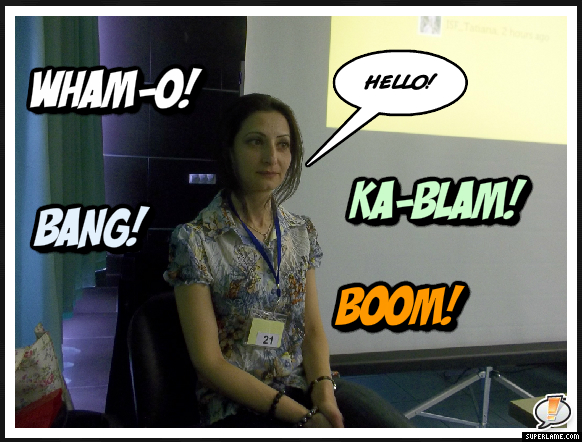
Anyway, down to the tools. To test the tools I decided to use my own photo with a simple "Hello!" message.

The first tool I would like to talk about is Speechable.
The tool is free but requires registration. However, it takes only seconds to register and you can either upload an image from your computer or type in the URL to the image you want to be uploaded. When the image is uploaded you can doodle (draw/write) on it, add a speech bubble or just add a text. For doodling there is a great selection of colours, The text box can be moved around the image and placed anywhere you like and the writing can be in any colour. For speech bubbles you can choose among four types of bubbles, size and colour of text. After saving the image, you can go back to it to edit it. There doesn't seem to be an embed code, but by right-clicking the image you can save it onto your computer. Options for sharing in social networking sites are all in place.

The second one is SuperLame and it is a lot of fun to use.
This tool doesn't require registration and is free. The best thing about it is that it has an onboarding (guidance) system. A little arrow at  the top of the screen guides you through the process of creating the captions. It also has an option for adding what it calls 'Sound FX' and I just added all the possible sounds on offer to my image to let you see what you can have. The options for sharing here are either to email the image or to save it. But I don't think this a big problem. As long as you can save it as an image, you can upload it wherever you like.

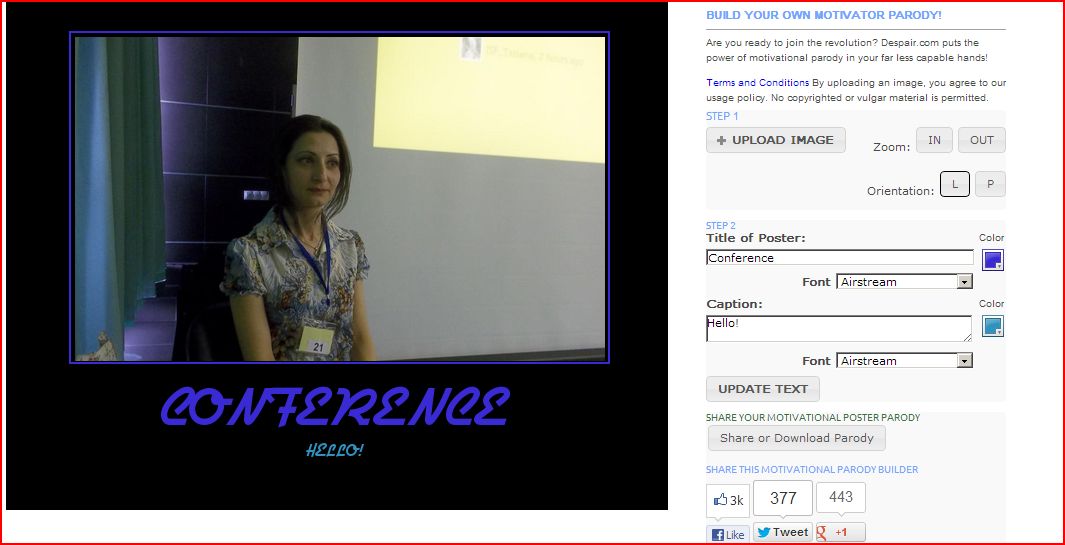
The third one is DIYDespair
This one also doesn't require registration and is free. All the options are on the right-hand side of the image screen. However, this one doesn't have the fancy options of the previous one. The title and the captions can only go under the image and not onto it. But still, I think, some older learners may find the tool enjoyable. All the available options can be seen on the image below. 

The fourth site is Motivator
The name is the opposite of the third (Motivator vs Demotivator) one but it functions in the same way. No registration is required and it is free to use. But there are too many adverts on the website, so I don't think it is very good for children in case they click on the links advertised. The options are again next to the image screen and the captions can only be placed under the image not on it. In terms of sharing, it is again either email to a friend or download. 

And the last tool is PimPamPum. It doesn't require registration and is free to use as all the other ones. However, I didn't create an image with this one because to create a caption you need to add images from Flickr and as I don't have any uploaded images on Flickr and didn't want to use other people's images, I decided to give it a miss. But as many of you may have accounts on Flickr, I thought I will share this one with you too. I found a sample caption for you to see what can be created with this tool. I like the fact that it allows creating slideshows which makes the storytelling even easier. I hope you like it too.  


Thursday, April 11, 2013

IATEFL Interviews 10 April

Liverpool Online
I decided to spend the evening watching some of the interviews because there are quite a few that I haven't watched and I wanted to watch at least some of them.

The first interview I watched was with Jamie Keddie whom I really like for his enthusiasm and ideas. Jamie is also the author of a very good book called Images.

Jamie starts the interview by telling a story about a seal and a polar bear and actually because he didn't finish the story in his interview I got on his website and found the lesson plan and the video for it because I wanted to find out how the story ends. I assume that's the whole point of videotelling (a technique which combines traditional story telling with video): making the listener want to find out what happens next. I did!  Jamie's website has more lesson plans for any teacher interested in doing some videotelling in their lessons. The website Jamie recommends looking at at the end of his interview does have some interesting material.


Next interview I watched was with Jeremy Harmer and I love him a lot. Jeremy says that he is interested in finding out whether there is a relationship between the way people practise music and the way people practise a language. I also became interested in the question and did some Google searching. I found quite an interesting article which is written by Benny Lewis who asked about the similarity between language learning and learning to play a musical instrument on Twitter. Some of the replies are really interesting.

Jeremy Harmer refers to research which shows that the length of practice doesn't mean much if the practice is not deliberate, i.e. involving full concentration, problem solving, involvement and engagement. If we think of that then we may actually find that when we do something because we have to do it, we do not remember much of it later. This is the case with language learning in Armenia where many teachers ask their students to memorize texts which they do just to repeat the texts in the lesson but two days later they forget what it was that they memorized. Jeremy Harmer says that a little homework which would require problem-solving could benefit a learner more than a lot of homework which they would probably do while watching TV. I totally agree!


The last interview that I watched was with Vicky Saumell. She is a teacher who encourages the use of technology in learning. Vicky talks about getting learners work published online (wikis, blogs) and getting teachers and learners from other countries to comment on the published work so that learners know that there is going to be some interaction and their work will not go unnoticed. One project that she talked about sounded quite interesting - a type of videotelling but done by learners. I actually even found the wiki that Vicky was talking about. The amount of work that Vicky's students have done is impressive. Vicky also mentions online projects with other countries, the benefits of which I know from my own experience as we did one with a school in Uruguay last year and are doing another one with the same school in Uruguay and a school in Brazil this year.

Tuesday, April 9, 2013

Second Day of IATEFL Liverpool

Liverpool Onlinee
I started the day first by watching the interview with Deborah Healey who has arrived from the USA and this is her first time at IATEFL. I really enjoyed it because she was talking about use of technology and games in teaching. My cup of tea, really.


The basic point that I agree with is that teachers shouldn't tech the classroom without thinking about how their learners will benefit from it. We should have the learner in mind whenever we incorporate technology in the lesson plan. Nik Peachy actually asked a question that I always get asked by teachers: if learners play games, how do we teach grammar? As I have already discussed in my previous posts, we can teach many things through games: grammar, vocabulary, writing, speaking, etc.


At this point I was already getting the feeling that I was at IATEFL. Next, I watched David Crystal's plenary talk with 309 people online. Not too bad, is it? (I will not go into the plenary because by the time I decided what to blog about Graham Stanely already blogged about it). There must have been more people in Liverpool, but the online audience was also big. Unfortunately, I couldn't participate in the online chat, which was very lively, because I had some students writing tests and didn't want them to think that I was chatting and ignoring them, which might have been true.

Next thing to do was to get on Facebook to see what was going on. Some friends shared photos from presentations that they attended, some mentioned their own presentation. I wished them good luck. Marcos Benevides shared the link to Vicky Saumell's presentation which was very nice, because now I might even think that I was there as well as Hakan Senturk and Burcu Akyol.

Next I read our roving reporters Sanja Bozinovic, Branca Segvic and Addeh Hovassapian's reports on teh sessions they had attended and got a full feeling of being in Liverpool. Now I get down to teaching feeling completely happy. :) Later in the evening I know that I can watch some of the sessions and some more interviews, read more reports and see more photos. 

Monday, April 8, 2013

First Day of IATEFL Liverpool - Interview with Gavin Dudeney

Liverpool Online
The first day of IATEFL in Liverpool and I am on the IATEFL online website reading roving reporter's blog posts and watching some interviews. Actually you don't have to be in Liverpool to be able to enjoy the conference. I know that being there is better but not knowing anything at all is worse.

I was hoping to get away from my lessons to watch the livestream of LTSIG workshops but,unfortunately, I didn't manage to do so, which means that I will be watching the recording of the workshop. But that will do.

So the first interview I watched was with Gavin Dudeney. Gavin and his team are responsible for the online presence of IATEFL conferences and I have to say they are doing a great job. It only takes a second to log into Facebook and Twitter to know all the news related to IATEFL. It is easy to find out who is a presenter and which hotel they are staying in, where they are having lunch or what places of interest they are visiting. This sounds odd as one may think why someone would be interested in this, but, strangely enough, that gives you a feeling of being part of community and being present at the conference even when you are far away.

Gavin mentions that when 6 years ago they started the online part of IATEFL, everyone thought that people would stay at home and just watch it online, but I don't think this will ever happen. Gavin is right in saying that the face-to-face meeting with people who you know virtually or meet just once a year is a completely different experience. For those who couldn't go for whatever reason it is a good place to keep up with what is going on and still participate by posting comments or blogging about it. For those who did manage to go, it is a good place to organize meetings with friends after the conference as the conference hall is huge and you may actually be there for a week and never see somebody you know that is there.

Gavin also mentioned the book Digital Literacies that I have pre-ordered being on sale at the conference which actually made me want to be there just to get it because I will only get it by the end of May. But well, I suppose it is worth waiting for.


Sunday, April 7, 2013

Word Cloud Generators

Word clouds have become quite popular tools for visualizing texts. Words in the cloud are single word tags, that show how frequently a word has been used in a text which is useful for understanding main ideas or concepts. Words that are bigger in size and thickness are the ones that are frequently seen in a text.

When we hear word cloud we mainly think of Wordle, but there are many more word cloud generators that could be better or worse than Wordle. So why not give them a try?

1. Tagxedo 
The site doesn't require registration. You start by typing/pasting in a URL, or a twitter/Del.icio.us ID, a keyword in the news or RSS. Then you choose the shape, layout, font and theme and click 'submit'. After the word cloud has been generated, you see a panel with more editing choices. When you are happy with the cloud, you can save it as JPG or PNG in different sizes or simply share it on the web.


2. ABCya!
A nice tool which doesn't require registration. You simply type or paste in the text and it creates a word cloud. This site doesn't accept links to articles that you would like to create a word cloud of. There is no choice in shapes but layout, font and colour can be selected. The generated word cloud can be printed immediately or saved, but in this case don't forget to add what format you want the image to be saved as. for example, I just add .jpg after the name of the file to save it as JPG image. If no format is specified, the image doesn't open.

3. WordItOut
The site doesn't require registration but when you have finished creating your word cloud it asks for an email address to which a link to your word cloud is sent. You just click on the link and can either download the image or share on various social networking sites. There doesn't seem to be an embed code but a picture can be uploaded onto any site, so that doesn't really matter.
Font, colours and size can be customized, but there is no choice of shapes and the layout of word tags is only horizontal.

4. TagCrowd
This tool doesn't require registration either. Word clouds can be created by either typing/pasting in a text, pasting a URL or even uploading a file which is quite handy. However, the word cloud created cannot be customized: there is no choice in font, colour, layout or shape. All word tags are horizontal on white background and of different shades of blue. The word cloud can be saved as a PDF file, but not as a picture. It can be printed and HTML code is also provided (but it doesn't embed an image, just a list of words), to add a sample image I had to make a screenshot of the cloud.

5. Tagul
You have to register first before you can start creating word clouds, but this is not a long process. You are sent a password which you can change after logging in.
To create a word cloud, you can either enter the text you want or the URL of the text you need..Next thing to do is to choose appearance, font, colours and click 'Visualize". When  the image appears, you can manually edit tags to get rid of articles, modal or auxiliray verbs, etc. After saving the changes, you need to click on 'Grab and Share'. Here you can either download the image as a picture file, print, get the HTML code or the link.

6. ImageChef
ImageChef Word Mosaic - ImageChef.com
You don't have to register with the website to be able to create word clouds. However, if you want to save your creations onto "My stuff", you should. The site allows creation of not only word clouds but also of visual poetry, banners, sketchpads, etc. Before you start creating a word mosaic, you can choose a shape, a background and word colour and font. You need to type or paste in a text (but a small one, it doesn't work with longer texts) and the word mosaic will be generated. You can choose the size of the image, you can share it on almost every social networking site, embed it and grab the link. By dragging the image onto your PC desktop, you can also save it as a picture file.


7. VocabGrabber
This is a very useful tool for language learners. It doesn't require registration. All you have to do is paste in a text and click 'Grab Vocabulary'. It creates a word cloud a screenshot of which can be seen on the left.


It also shows how many words have been found in the thesaurus and allows you to create a wordlist.


And the beauty of it is that the word cloud created is interactive. When you click on a word, the site creates a snapshot of a visual thesaurus for that word;


provides the definitions of the word;


and gives sample sentences with that word in them.


8. TagCloud
No registration required to use this site. You cannot type in a text, you only have to paste the URL to convert whatever is on the site into a word cloud. The result is a very nice looking flash word cloud that can be downloaded as a zip file. I have taken a screenshot of the cloud because it cannot be added to the blog as it is, i.e. a flash word cloud. It also provides an embed code, but it only comes up as a list of words as can be seen below.
learning resources blended approach face classroom instructional materials course time online addition used state blend students content higher

9. YouAreYourWords
The site doesn't require registration. All you have to do is to upload a picture whcih you want to be the background of your word cloud, then paste the text and choose colours from a limited range. You can also choose the font. You can then share your word cloud and/or download it as image. The product looks nice, but I am not so sure about its use in education as it is a bit difficult to read the text.


10. Wordle
This site doesn't require registration. The downside is the size of the embeded image - it is very small. To solve this problem, you can either click on 'print' and then save it as a PDF file, or, alternatively, you can make a screenshot of the image after saving it to the public gallery.
Another problem with this site is getting word tags using a link. If the site, the URL of which you have pasted into the bar, doesn't have Atom or RSS feed, Wordle cannot create a cloud. However, pasting in a text usually bypasses this problem.
Font, size, colours and word tag layout are customizable, but the shape cannot be selected.

And finally, a Slideshare user vreed17 has added a presentation with 40 ideas for word cloud use in education.


Forty Interesting Ways To Use Wordle In The C from Vreed17

Credits:
Word Clouds generated using the article at PennState